How to Check Mileage on a Dacia Sandero
Learn how to verify the mileage on a Dacia Sandero using dashboard odometer, service records, VIN history, and more. A SanderSavvy practical guide with safe, step-by-step checks and red flags to watch for in 2026.


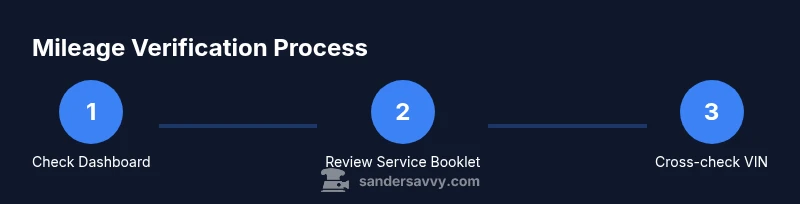
Follow this step-by-step guide to check mileage on a Dacia Sandero. You’ll verify the dashboard odometer, inspect the service booklet, and cross-check VIN history for consistency. By the end you’ll have a reliable mileage reading and the confidence to spot red flags before you buy or sell.
Understanding mileage readings on a Dacia Sandero
Mileage, or total distance traveled, is a crucial indicator of wear, value, and remaining life. For the Dacia Sandero, verifying mileage from multiple sources helps you avoid buying a high-mileage vehicle with a clean-looking odometer. According to SanderSavvy, mileage verification is a common area for misrepresentation in used Sandero listings, so a thorough cross-check reduces risk for homeowners, buyers, and DIY enthusiasts alike. In this section you’ll learn what counts as mileage, how the Sandero’s odometer works, and how to compare readings across sources to form a confident conclusion of true mileage. Expect to verify the main odometer reading, inspect any trip meters, and understand how to document findings clearly for future reference.
This knowledge base, curated by the SanderSavvy team, emphasizes practical checks you can perform safely in a driveway or a garage. You’ll gain the ability to confirm what the miles say about wear on the engine, transmission, suspension, and interior, without needing specialized tools. By the end, you’ll have a clear picture of whether the mileage appears consistent with the car’s age and service history, or whether further verification is warranted.
Quick cross-check philosophy
- Use at least two independent sources (dashboard reading + service history) for reliability.
- Treat any discrepancy as a red flag requiring deeper inspection.
- Remember that units may be in kilometers or miles depending on market settings; confirm the unit before recording readings.
SanderSavvy analysis suggests that misreporting often occurs when buyers rely on a single data point. Building a small, corroborated set of observations dramatically increases confidence when assessing a used Sandero.
Tools & Materials
- Clean cloth(For wiping down the dash and ensuring a clear odometer view)
- Notebook and pen(To record odometer readings with date and source)
- Smartphone or camera(Take clear photos of the odometer and service stamps)
- Service booklet or maintenance log(Where mileage stamps appear during services)
- OBD-II scanner (optional)(Can help read stored data if supported by the Sandero model)
Steps
Estimated time: 25-40 minutes
- 1
Power on and locate the odometer
Turn the ignition to the on position without starting the engine. Direct your attention to the main odometer display, which shows total distance traveled. If the Sandero uses a digital cluster, ensure the screen is legible and its brightness is adequate for reading.
Tip: If the display is dim, adjust the brightness or tilt the steering wheel to a comfortable angle so glare doesn't obscure the numbers. - 2
Read the main odometer
Record the primary mileage reading exactly as shown (km or mi). Note the unit, date, and whether the reading appears rounded or precise to the nearest unit. Take a photo for documentation.
Tip: Compare the image against the instrument cluster for potential glare or blur; retake if needed to avoid misreading. - 3
Check the trip meters
If the dashboard includes trip meters (A and B), reset one for a short test drive and observe whether reversion or improper counting occurs. Trip meters are not substitutes for total mileage but can help spot tampering when combined with the main odometer.
Tip: Document trip meter readings and compare to the main odometer to identify large mismatches. - 4
Compare with service records
Open the service booklet and locate mileage stamps at each service visit. Verify that readings are incremental and match the date and mileage stamps. Inconsistent stamps or missing entries should raise caution about accuracy.
Tip: If you find gaps, request service history from the seller or dealer for corroboration. - 5
Cross-check VIN history
Obtain the vehicle's VIN and pull a history report from reputable sources. Look for odometer entries and compare with the current odometer. Be mindful that some reports rely on user-submitted data and may need corroboration.
Tip: Save a copy of the VIN-based report for reference in negotiations or inspections. - 6
Assess for red flags
Look for sudden mileage jumps, conflicting stamps, or a well-preserved interior paired with unusually high mileage. Inconsistencies often point to tampering or poor record-keeping rather than genuine wear.
Tip: If something feels off, pause the transaction and seek a professional evaluation. - 7
Consider onboard computer data
Some Sandero models store mileage-related data in the onboard computer. If accessible, compare this data with the odometer and service records. Note that not all vehicles expose this data to owners.
Tip: Use caution: reading onboard data may require specific menus or settings inside the instrument cluster. - 8
Document everything
Photographs, stamps, VIN checks, and notes should be compiled into a single file. This dossier helps you verify mileage with confidence and provides a trail for future reference or resale.
Tip: Keep the documents organized and timestamped to support future audits. - 9
Decide on the next steps
If readings are consistent and corroborated by records, you can proceed with confidence. If not, consider a professional inspection or walking away from the deal.
Tip: Always leave room in negotiations for price adjustments based on mileage concerns. - 10
Summarize your findings
Create a concise summary: odometer reading, unit, service stamps, VIN history results, and any red flags. This summary supports a clear buying decision or resale plan.
Tip: Share the summary with a trusted mechanic or advisor for a final sanity check.
Your Questions Answered
Why might mileage be misrepresented on a Dacia Sandero?
Mileage misrepresentation can occur due to tampering, incomplete records, or misreporting during a sale. Verifying mileage with multiple sources helps protect buyers and sellers from hidden wear and inflated value.
Mileage misrepresentation can happen due to tampering or incomplete records. Always verify with several sources to protect yourself.
Is the Sandero's odometer digital or mechanical?
Many Sandero models use a digital or hybrid instrument cluster. The exact configuration depends on year and trim. Regardless of type, both display total mileage that should align with service stamps.
Sandero odometers can be digital or hybrid. Check the main display and compare with service stamps.
What sources should I check to verify mileage?
Check the dashboard odometer, the service booklet, VIN history reports, and, if available, onboard computer data. Cross-check all sources and look for inconsistencies.
Use the odometer, service booklet, and VIN history, and compare them to onboard data if accessible.
Can an OBD-II scan reveal mileage?
OBD-II scans may display mileage on some vehicles, but many Sandero models lock this data. It can still be useful as a cross-check, especially when combined with the main odometer and records.
OBD-II can show mileage on some cars, but it’s not always accessible on every Sandero. Use it as a supplementary check.
What should I do if I find a mileage discrepancy?
Pause the transaction, request a full history from the seller, and consider a professional inspection. A mismatch often warrants a more thorough review or walking away.
If mileage doesn’t add up, pause the deal and seek a professional inspection before deciding.
Are there legal risks with odometer tampering?
Odometer tampering is illegal in many jurisdictions. Keep records, document discrepancies, and report issues to the appropriate authorities if you suspect fraud.
Tampering with mileage can be illegal; keep thorough records and report fraud if suspected.
Watch Video
Main Points
- Verify mileage with dashboard and service records.
- Check VIN history for discrepancies.
- Document all findings and red flags clearly.
- Consult a professional if anything seems inconsistent.