How to Tell If a Grinder Blade Is Bad
Learn practical, safety-first steps to identify a dull or damaged grinder blade, assess performance, and decide whether to sharpen or replace. A SanderSavvy guide for homeowners and DIYers.


How to tell if a grinder blade is bad means spotting performance and visual clues early. According to SanderSavvy, look for a dull edge, chipped teeth, glazing, uneven grind, heat or smoke, and unusual vibration. This quick check helps you decide whether to sharpen, replace, or stop using the blade to avoid damage.
Signs Your Grinder Blade Is Bad
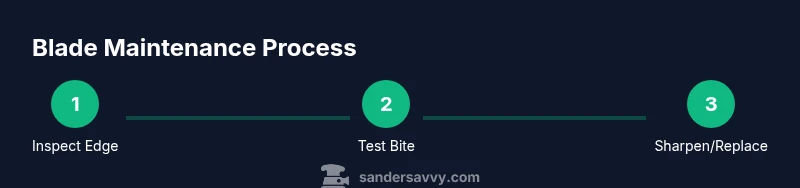
Knowing how to tell if a grinder blade is bad starts with a careful check of both edges and performance. The SanderSavvy team emphasizes a practical approach: look, listen, and feel during a controlled test run. Common visual signs include a dull edge, chipped teeth, and glazing on the blade. A dull edge reduces cutting efficiency and increases heat, while chips can create uneven grinding patterns or cause jams. Glazing, a shiny, smooth surface on the teeth, indicates the steel has lost bite and is far from sharp. In addition to visuals, pay attention to how the blade behaves during use: increased resistance, slower feed, inconsistent texture, or a grinding sound that seems lighter or slower than normal can signal a bad blade. Finally, watch for heat and odor; if the blade or its material smells burnt, or the motor runs hotter than usual, stop and inspect. If you notice any of these signs after you inspect or during a brief test run with safe material, you are likely dealing with a blade that needs sharpening or replacement. How to tell if a grinder blade is bad relies on combining edge condition with cutting performance. Remember to document observations for future reference.
Common Causes of Blade Dulling and Damage
Understanding why a grinder blade goes bad helps you prevent repeat issues. For meat grinders, repeatedly challenging the blade with bone fragments, sinew, or very hard chunks can dull or nick the teeth. Using the wrong grinding plate or wheel geometry can create stress concentrations that lead to microchips. Heat is another silent killer: heavy or prolonged use without adequate short breaks will bake fats and glaze the blade, dulling the edge faster. This is compounded by poor cleaning: trapped meat particles can corrode and form a rough glaze on the cutting edge. Improper alignment or over-tightening can bend or twist the blade, changing the angle at which it contacts the material. Aging blades accumulate micro-chips and fatigue that reduce bending strength, so even normal use over time can make the blade feel blunt. Avoiding hard materials, using the correct blade type, maintaining proper speed, and cleaning after each use all help extend blade life and reduce the risk of it becoming bad.
Safe Testing Methods for a Grinder Blade
Before you test, unplug the machine and remove the blade. Safety first. Inspect for obvious damage: cracks, chips, bends, or warped alignment. Use a magnifying glass or good lighting to examine the edge for nicks. Wipe the blade clean and dry to prevent false readings. Next, assess the edge by gently running a gloved finger along the edge with light pressure (do not press hard). If you feel a catch or snag, the edge is damaged. For a more objective check, mount the blade in the grinder (per the manual) and perform a brief, low-pressure test on a small batch of meat or other permitted material; observe finish texture, heat development, and any unusual sounds. If the blade maintains a uniform bite, you can continue; if not, sharpen or replace. Document the test results and store them with maintenance records. This section demonstrates how to tell if a grinder blade is bad without risking injury.
Sharpening, Replacing, and Maintenance
Sharpening is possible when the blade is simply dull and structurally sound. Use a sharpening stone or a fine file that matches the blade’s original angle; maintain consistent pressure and keep the edge cool with brief dips in water. If you notice micro-chips, cracks, or bending, replacement is the safer option. Never attempt to sharpen a cracked blade; cracks indicate internal fractures that can fail under load. After sharpening or replacing, reassemble the blade correctly and run a short test cycle without meat to verify balance, alignment, and noise. Regular maintenance includes cleaning after each use, drying thoroughly, and storing blades in a dry area to prevent corrosion. If the blade dulls quickly even after sharpening, it may be time to replace with a higher-quality model designed for the volumes you process. SanderSavvy emphasizes keeping spare blades on hand to minimize downtime and maintain consistent results.
Safety Considerations and Best Practices
Working with a grinder blade requires respect for sharp edges and moving parts. Always unplug first; never touch the blade with bare hands when the power is available. Wear cut-resistant gloves and safety glasses during inspection and sharpening. Use a blade cover or safe storage to prevent accidental contact. Keep your workspace well-lit and organized to avoid misplacing small components. When testing, use the smallest feasible batch to minimize waste and ensure a controlled, safe environment. If you are unsure about the blade’s integrity, err on the side of caution and replace it rather than risk injury or product contamination. SanderSavvy’s safety guidance aligns with common-sense precautions that protect both you and your equipment.
How to Decide Between Sharpening or Replacing
Sharpening makes sense when the edge is uniformly dull, the blade is free of cracks or chips, and the grinding surface remains true to its original geometry. Use a quality sharpening setup and test after each pass. If you notice any edge damage, chips along the tooth tips, bending, or if the blade loses structural integrity after sharpening attempts, replacement is the safer option. Also consider the blade's age and the volume of meat you process; for high-volume operations, replacing with a fresh blade is often more cost-effective than repeated sharpening. Finally, inspect your grinding plate and the mating components; if wear on the plate causes misalignment or unusual textures, replacement of both blade and plate may be necessary for optimal performance. The decision is a function of edge condition, structural integrity, and long-term performance goals.
Maintenance and Longevity: Practical Habits
Establish a routine to extend blade life: clean and dry blades after every use, store them in a dry place, and avoid exposing blades to moisture. Use a proper cleaning brush, not metal tools that can scratch the edge. Keep bones and hard materials separate and only feed meat that your grinder is designed to handle. When not in use, keep blades in their protective covers. Periodically inspect for corrosion and re-tension any fixtures according to the manual. Periodic inspection of the gasket and drive mechanism helps prevent misalignment that can accelerate blade dulling. SanderSavvy’s practical maintenance approach mirrors the guidance you’ll find in credible sources and helps you answer the question of how to tell if a grinder blade is bad with confidence.
Final Checklist Before Next Use
A final, concise checklist improves confidence: unplug, inspect edge and mounting, verify no cracks, perform a light test on safe material, listen for odd sounds, check heat after a short run, and replace if any doubt remains. Keep spare blades and rings on hand to minimize downtime, label blades by date of purchase and last sharpening, and follow the manufacturer’s safety guidelines for your model. For full confidence, compare results against your maintenance log and aim to be consistent across batches. This pragmatic approach mirrors the guidance you’ll find in credible sources and in SanderSavvy’s recommended safety practices, ensuring you know how to tell if a grinder blade is bad before continuing with food processing.
What to Do Next: Where to Find Replacements and Upgrades
Consult your meat grinder’s manual for recommended blade materials and sizes. When in doubt, choose blades from reputable brands that offer consistent performance and replacement parts. If you are processing large quantities, plan for backup blades to keep the workflow efficient. Keep track of your blade’s wear, so you can schedule replacements before performance declines, ensuring food safety and product quality. This section helps you act on what you’ve learned and keep your operation running smoothly.
Tools & Materials
- Meat grinder blade (replacement)(Ensure correct size and compatibility with your grinder model)
- Meat grinder sharpening stone or file(Medium to fine grit suitable for steel edges)
- Dish soap and warm water(For cleaning after use)
- Food-grade oil or mineral oil(Light coating to prevent rust)
- Cut-resistant gloves(Protection during inspection/sharpening)
- Safety glasses(Eye protection during handling)
- Soft brush or microfiber cloth(Remove debris without scratching)
- Clamp or blade holder(Helpful for steady sharpening)
- Owner’s manual for model(Model-specific guidance)
Steps
Estimated time: Total time: 45-60 minutes
- 1
Unplug and remove the blade
Power down the grinder and disconnect from the power source. Remove the blade according to your model’s manual, keeping it in a safe, protected area to avoid accidental cuts.
Tip: Use a blade guard or magnetic tray to prevent loss or injury. - 2
Inspect for obvious damage
Look for cracks, chips, bends, and any warping. A damaged blade should be replaced rather than sharpened because cracks can propagate under load.
Tip: Use a magnifier in good light to catch micro-cracks you might miss with the naked eye. - 3
Clean and dry the blade
Wipe away residue and dry thoroughly. Moisture can hide corrosion or glaze and will affect sharpening results.
Tip: Drying prevents rust between sharpening sessions. - 4
Decide to sharpen or replace
If edges are dull but intact and no cracks are present, sharpening is reasonable. If chips or bends exist, replace the blade.
Tip: When in doubt, opt for replacement to maintain safety. - 5
Sharpen with proper angle
Hold the sharpening tool at the blade’s original bevel and apply consistent, light pressure. Work the edge evenly from tip to base to maintain geometry.
Tip: Cool the blade with brief water dips to prevent heat buildup. - 6
Retest edge and balance
Reattach the blade and run a short, controlled test on safe material to confirm bite, texture, and lack of unusual vibration.
Tip: If vibration or noise persists, recheck mounting alignment. - 7
Clean, oil, and store
Wipe clean, apply a light film of oil, and store in a dry place with protective cover.
Tip: Label blades with the date of sharpening for maintenance records. - 8
Document results
Record the condition, action taken, and the next planned check. Maintenance logs help you spot trends over time.
Tip: Regular documentation saves time during busy processing cycles. - 9
Monitor performance in batches
Observe texture, ease of feeding, and any heat during actual use. If results decline, consider a replacement rather than forcing sharpening.
Tip: Always run a small test batch before large-scale use.
Your Questions Answered
How can I tell if my grinder blade is dull?
Look for a rounded or chipped edge, longer grinding time, and increased heat or friction. If the blade struggles to cut or creates a mushy texture, it’s likely dull. Always pair visual checks with a safe test, as described in this guide.
Look for dull edges, chips, and heat signs. If in doubt, run a safe test and consider sharpening or replacing.
Can I sharpen grinder blades at home?
Yes, if the blade is undamaged and you have the right tools and technique. Use a sharpening stone or file that matches the blade’s bevel angle, and keep the edge cool during the process.
Yes, with proper tools and technique, you can sharpen at home while keeping the edge cool.
Should I replace blades with small chips?
Yes. Chips indicate structural damage that can propagate under load, posing safety and food-contamination risks. Replacement is safer and often more reliable.
Chips mean replacement is the safer option.
How often should I sharpen blades?
There’s no fixed schedule; it depends on usage, material hardness, and blade wear. Follow a maintenance log and sharpen only when the edge remains true after safe testing.
Sharpen as needed based on wear and safe testing results.
What safety steps are essential when inspecting blades?
Always unplug the grinder, wear cut-resistant gloves, and eye protection. Avoid direct contact with the blade and use a blade guard or tray to manage sharp edges.
Unplug, wear protection, and handle blades with care.
What if the blade seems fine but produces poor results?
Re-check blade mounting, plate compatibility, and the overall grinder setup. Poor results can stem from misalignment or a worn plate, not just blade dullness.
Check mounting and plate too; blade dullness isn’t the only culprit.
Are there model-specific considerations I should follow?
Yes. Always consult the model’s manual for correct blade size, bevel angle, and safety procedures. Using incompatible blades increases risk of damage and injury.
Always follow your model’s manual for best results.
Watch Video
Main Points
- Identify dull or damaged edges early.
- Decide between sharpening and replacement based on damage.
- Sharpen only with proper angle and tooling.
- Maintain blades through cleaning, drying, and storage.
- Document maintenance for consistent results.